KOL module *
This is an option in licence. For more informations contact our Support team.
The Advanced Key Opinion Leader (KOL) Management Module is a comprehensive enhancement to the Sales Vision CRM suite, designed to provide structured, secure, and efficient management of Key Opinion Leader data. This module addresses the need for centralized KOL tracking, enhanced data security, and improved analytical capabilities across pharmaceutical and healthcare organizations.
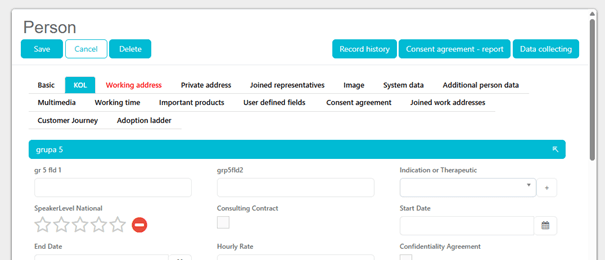
Users marked with KOL checkbox can access KOL-related functionalities (“KOL” tab and “KOL” fields).

How to add a new KOL group?

How to add a new field in the KOL group?


New type of field
– star rating: displays 5 “empty” stars by default on “KOL” tab. If, for instance, 3 stars are selected, all 3 stars are displayed filled with color, while remaining 2 stars are not filled with color.

How to set order of the groups and fields?
To set order of the groups go to codelist -> Company -> 1019 Group in module KOL – set “Order sort” for each group:


To set order for specific field, set “Order sort” for each field (when located in “KOL – Configuration)”.

Control size reflects the row length of the field (1/3, 2/3, 3/3)
Who can activate KOL checkbox?
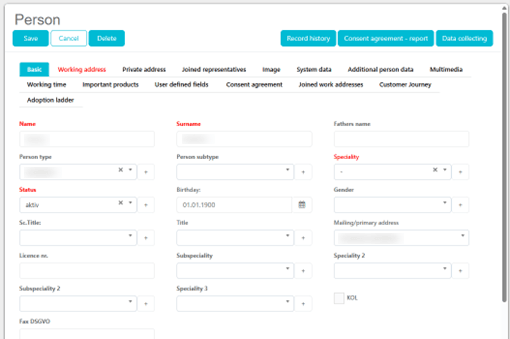
All users can activate the KOL checkbox. KOL checkbox is visible in
- Person edit form on both iPad and web platforms
- Person visit window on both iPad and web platforms When checkbox is not selected, the KOL tab is not visible:
When selected, the KOL tab appears:
New fields type:
-Multiselect icon

-Documents upload

-Star rating

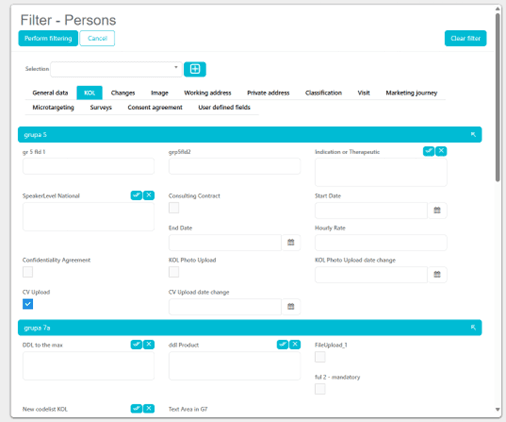
Filtering possibilities
-KOL checkbox in the Person quick search

-KOL deep person filter
Person edit and new visit entry
Person edit and new visit entry as non-KOL user (on the web platfrom the “KOL” is only a indicator, while on the iPad the non-KOL users can also update the field):


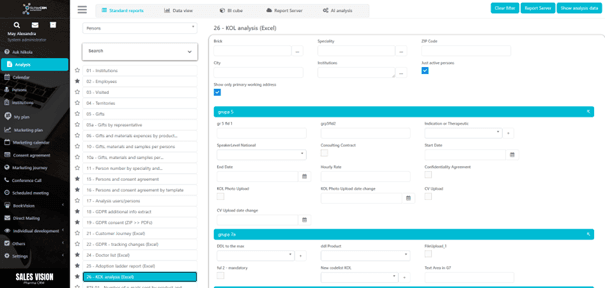
New standard report
New standard report names “26 – KOL analysis (Excel)” – located under Analysis -> Standard reports -> Persons category. Available only to users designated as "KOL Users"

Email notice
Email notice when a person is marked as a KOL:
